Gonnaorder
  • Home
  • Home
  • Solutions
    • Online Ordering System
    • Table Ordering
    • Online QR Menu
    • Self-Ordering Kiosk
    • Reservations
    • Integrations
    • Mobile Apps
    • Loyalty Program
    • Gift Cards
    • Table Payments
    • AI Ordering
  • Demo
  • Pricing
  • Your business
    • Business Types
    • Hotels
    • Catering
  • Login
  • Sign up FREE now
  • Book a Demo

GonnaOrder Help Center > Settings

  • Register
    • Create a GonnaOrder Account
    • Login to Your Account
    • Register Your Store
    • View the List of Your Stores
    • Update Your Profile Information
    • Create, Update or Reset your Account Password
    • Delete Your Profile
  • Catalog
    • Manage Categories
    • Link External Categories in Multi-Stores
    • Manage Top-Level Categories
    • Manage Store Items
    • Manage Combos and Item Groups
    • Manage Reusable Products
    • Manage Catalog Via Excel
    • Reorder Categories & Store Items
    • Add Images to Store Items
    • Set Prices & Discounts
    • Change the Availability Status of Store Items
    • Manage Translations
    • Use Option Groups
    • Use Price Variants
    • Use Item Characteristics and Allergen Information
    • Import Catalog From Photo or PDF
    • Use Nutrition Information
    • Import Catalog From Other Store
    • Import Catalog From an External Link
    • Delete Catalog - For Users with Special Access Rights
    • Set up Stock Features
    • Integrate Your Store with Wolt
    • Set Up VAT for Your Store and Products
    • Manage Stations
    • Manage Printers
    • Manage Sales Points
    • Manage Item Tags
  • Settings
    • Change the Store Details and Images
    • Manage the Order Settings
      • Order Capture Settings
      • Order Management
      • Select Your Order Delivery Method
      • Real-Time Order Confirmation and Marketplace Bidding
      • AI Ordering Assistant
    • Manage Your Payment Settings
      • Supported Payment Providers Overview
      • Set Store Payment Options
      • Use payabl. as a Payment Provider
      • Use Mollie as a Payment Provider
      • Use Stripe as a Payment Provider
      • Use Globalpayments as a Payment Provider
      • Use Trust Payments
      • Use RMS as a payment provider
      • Use NBG Pay as a Payment Provider
      • Use Viva as a Payment Provider
      • Use JCC as a Payment Provider
      • Use Paymentsense as Payment Provider
      • Use Epay as a Payment Provider
      • Use Square as a Payment Provider
      • Receive Payments With Paypal.me
      • Use Fygaro as Payment Provider
      • Use Apcopay as a Payment Provider
      • Use hobex as Your Payment Provider
      • Use Ryft as a Payment Provider
      • Use ABA PayWay as a Payment Provider
      • Use Rootline as a Payment Provider
      • Use Solidgate as a Payment Provider
      • Use ClearAccept as a Payment Provider
      • Use emerchantpay as a Payment Provider
      • Use Neosoft as a Payment Provider
      • Use Cardlink as a Payment Provider
      • Use Eurobank as a Payment Provider
      • Use Alpha Bank as a Payment Provider
      • Use Flitt as a Payment Provider
      • Receive Payments With Other Payment Providers via a Link
      • Use VR Payments as Your Payment Provider
      • Use Citypay as Your Payment Provider
      • Use Wallee as Your Payment Provider
      • Use myPOS as a Physical Payments Provider
      • Use PXP as a Payment Provider
      • Use DNA Payments as a Payment Provider
    • Manage Table Ordering Settings
    • Manage Table Reservation Settings
    • Manage Pickup Settings
    • Manage Delivery Settings
    • Change the Catalog Settings
    • Manage Schedules and Opening Times
    • Allow Voucher Top-Up by Customers
    • Manage Ordering Rules
    • Configure Checkout Recommendations
    • Connect GonnaOrder to Your Marketing Tools
    • Manage Promotions
    • Manage Discount Vouchers
    • Manage Top-Up Vouchers
    • Configure Order Desired Time, Schedule and Slots Settings
    • Upload and Manage a Store Brochure
    • Define Mandatory or Optional Fields in Customer Information
    • Manage Your Domain Settings
    • Enable Customer Authentication and Save Ordering Information
    • Promote Ordering With GonnaOrder Mobile Apps
    • Manage Integrations
      • Connect Your Store to Twinsoft
      • Connect Your Store to Gladius
      • Connect With Flex Delivery
      • Connect to mynext
      • Connect Your Store to WooDelivery
      • Enable HubRise Integration for Your Store
      • Integrate Orders and Payments With Powersoft
      • Connect Your Store to Shopify
      • Connect Your Store to EPOS Direct
      • Connect Your Store with Epos Now
      • Connect with Sunsoft
      • Connect Your Store with Loyverse POS
      • Connect Your Store With Poster
      • Connect Your Store to HIT
      • Connect Your Store with TISSL
      • Connect Your Store to iotSoft
      • Connect Your store with Wrapp
      • Connect Your Store to Witec
      • Connect Your Store with White Label POS
      • Connect Your Store with Purple-I
      • Connect Your Store with Meganet
    • Enable and Manage Open Tab Table Ordering
    • Link Multiple Stores
    • Add Custom Branding to Your Store
    • Configure the Customer Loyalty Scheme
    • Set Up Gift Cards
    • Configure Store Notifications
  • Tables
    • Manage Tables
    • Manage Tables Via Excel
    • Manage Sections and Floor Plans
    • Set up Rooms and Locations
    • How Different Locations are Saved on Cookies
  • Share
  • Orders
    • View the List of Orders
    • Sort, Filter, and Combine Orders
    • Confirm, Accept or Reject an Order
    • Order Decomposition
    • Print & Download an Order
    • Track Order Progress Via Order Tracker
    • Track Delivery Orders Via Delivery Tracker
    • Receive Browser Notifications for your orders
    • Automatically Print Incoming Orders
    • Order PDF Styles Supported by GonnaOrder
    • Order Capture
    • Update Submitted Orders
  • Reservations
    • Reservations By Store Admins
    • Reservations By Customers
  • Standalone Payments
    • Allow Customers To Pay Later for What They Ordered
    • Let Customers Order at Table and Pay Later Using GonnaOrder Open Tab
    • Receive Customer Table Payments With Powersoft POS
    • Create a Payment Request Link for an Order
    • Create Payment Requests for Custom Amounts
    • Enable Standalone Payments
    • View Customer Payments
  • Top Ups
  • Balance and Refunds
  • Manage Payment Transactions
  • Statistics & Reports
    • View Order Value Statistics
    • View Orders Statistics
    • View Menu Viewing Statistics
    • View Order Item Reports
    • View Loyalty Statistics
    • View Reservation Statistics
    • View Balance Reports
    • View Notifications Statistics
  • Users
    • Manage Users
    • Customer Self Care Portal
    • Store Operator’s Guide
  • Billing
  • Supported Languages
    • Supported Languages in App
    • How GonnaOrder Uses Languages
  • GoAdmin Mobile App
    • Download and Start Using the GoAdmin App
    • Manage Orders on GoAdmin App
    • Manage Your Entire Store on the GoAdmin App
    • Setup Auto Printing on GoAdmin App
    • Receive Notifications on GoAdmin App
  • GoKiosk App
  • Manage Customers
  • Branded App Menu Configurations
  • Miscellaneous
  • Developers
    • Introduction to GonnaOrder Admin API
    • API Authentication and Getting Access
    • Publish Orders to an External Application With a Custom Integration
    • GonnaOrder Event Subscription
    • Fetch Store Catalog from the GonnaOrder API
    • Update Catalog Items via the GonnaOrder API
    • Payment APIs & Webhooks
    • Code Examples & Use Cases
    • Integrate GonnaOrder Vouchers & Loyalty Scheme with POS Via API
    • Developer Support
March 18, 2020June 30, 2026

Settings

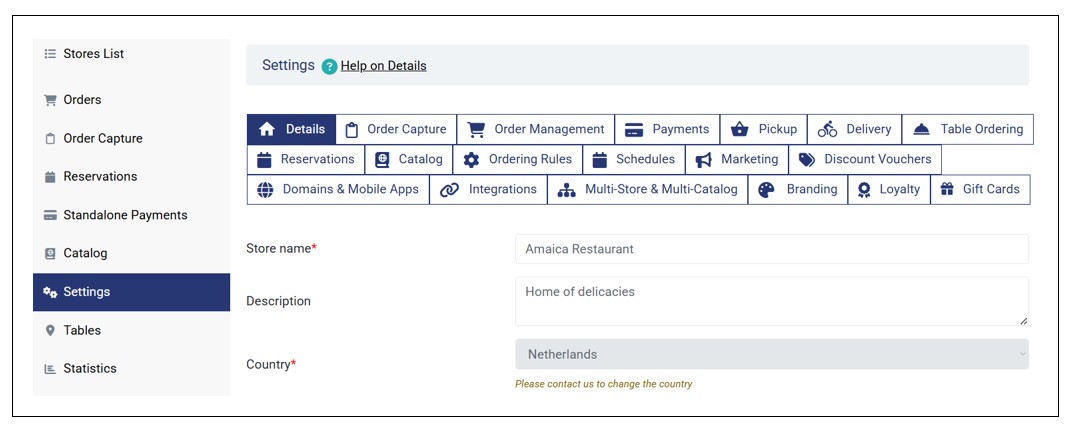
GonnaOrder gives you the flexibility to set up your digital store based on your needs. There are a host of settings that you can configure to set how the customer menu appears, add delivery and pick up information, set payments options, manage your domains and integrate your store with last mile delivery platforms among other things.

Under Settings, you have the options to do the following :

  • Change the Store Details and Images
  • Manage the Order Settings
  • Manage Your Payment Settings
  • Manage Table Ordering Settings
  • Manage Table Reservation Settings
  • Manage Pickup Settings
  • Manage Delivery Settings
  • Change the Catalog Settings
  • Manage Schedules and Opening Times
  • Receive Sound or Email Order Notifications
  • Manage Ordering Rules
  • Connect Gonnaorder to Your Marketing Tools
  • Manage Discount Vouchers
  • Configure Order Desired Time, Schedule and Slots Settings
  • Define Mandatory or Optional Fields in Customer Information
  • Manage your Domain Settings
  • Enable Customer Authentication
  • Promote Ordering with GonnaOrder Mobile Apps
  • Manage Integrations
  • Enable and Manage Open Tab Table Ordering
  • Link Multiple Stores
  • Add Custom Styles to Your Store
  • Configure Customer Loyalty Scheme
  • Set Up Gift Cards

Settings Section

Post navigation

Manage Item Tags
Change the Store Details and Images
Solutions
  • Online Ordering System
  • Table Ordering
  • Online QR Menu
  • Self-Ordering Kiosk
  • Reservations
  • Integrations
  • Mobile Apps
  • Loyalty Program
  • Gift Cards
  • Table Payments
  • AI Ordering
Information
  • Demo
  • Pricing
  • FAQ
  • Help Center
  • Resource Center
  • News Coverage
  • Newsletter
  • Product Updates
Your Business
  • Business Types
  • Hotels
  • Catering
  • Become a Reseller
Company
  • Contact us
  • About us
  • Terms of use
  • Cookie Policy
  • Privacy Policy
  • Careers
Solutions
  • Online Ordering System
  • Table Ordering
  • Online QR Menu
  • Self-Ordering Kiosk
  • Reservations
  • Integrations
  • Mobile Apps
  • Loyalty Program
  • Gift Cards
  • Table Payments
  • AI Ordering
Your Business
  • Business Types
  • Hotels
  • Catering
  • Become a Reseller
Company
  • Contact us
  • About us
  • Terms of use
  • Cookie Policy
  • Privacy Policy
  • Careers
Information
  • Demo
  • Pricing
  • FAQ
  • Help Center
  • Resource Center
  • News Coverage
  • Newsletter
  • Product Updates
Company
  • Contact us
  • About us
  • Terms of use
  • Cookie Policy
  • Privacy Policy
  • Careers
Gonnaorder
Sign up FREE now Book a Demo

Ask AI about GonnaOrder

Get an independent view of how GonnaOrder fits your restaurant, from the AI assistant you already use.

ChatGPT Claude Perplexity Google AI Mode Grok Copilot
See the question we ask

I run a restaurant and I'm considering GonnaOrder (gonnaorder.com) as my online ordering platform. Act as an experienced restaurant technology consultant. Based on gonnaorder.com, explain how I can get the most business value from it: online ordering, QR table ordering, self-service kiosks, my own branded app, payments and POS integrations, and how it compares to delivery marketplaces that charge commission. Then recommend how I should set it up to match my restaurant's operational flow. End by asking me up to 3 questions about my restaurant so you can tailor your advice.


© 2026 GonnaOrder
Live chat logo
Live Chat
Facebook logo
Facebook
WhatsApp logo
WhatsApp
Viber logo
Viber
Email logo
Email
chat-turq